MiDNI: the digital DNI your Spanish STR must accept
If you manage short-term rentals or holiday apartments in Spain, something changed on 2 April 2026 that directly affects how you handle guest check-in. Under Royal Decree 255/2025, every private entity operating in Spain, including vacation rental managers, is now legally required to accept MiDNI as a valid form of identification, on equal footing with the physical DNI card.
Your Spanish guests can already show up with their digital ID on their phone. You need a system that can handle it.
What is MiDNI?
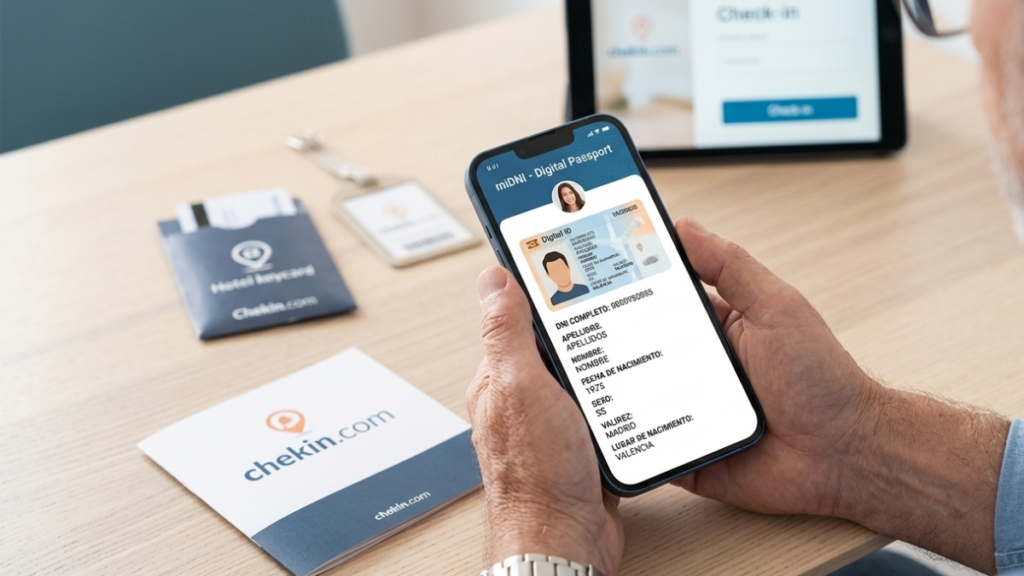
MiDNI is Spain's official digital identity app, developed by the National Police and the Ministry of Interior. It allows Spanish citizens to carry their DNI, Spain's national identity document, on their smartphone with full legal validity.
It is not a photo of the card. It is not a scanned copy. It is the actual document in digital format, protected by biometrics (fingerprint or face recognition) and a personal PIN. The app generates a QR code that guests can show directly from their phone, which can be scanned to extract their identity data instantly.
MiDNI is Spain's official mobile DNI app, launched in April 2025 by the Policía Nacional. Since 2 April 2026, Royal Decree 255/2025 requires all public and private entities in Spain to accept it as a legally valid form of identification.
What Royal Decree 255/2025 means for your rental business
The regulation is straightforward: Spain's digital DNI carries the same legal weight as the physical card. For vacation rental managers, this means three things in practice.
First, you cannot refuse to register a guest who identifies themselves with MiDNI instead of their physical DNI. Second, your guest registration system must be able to process the data that the digital DNI contains. Third, data collected through MiDNI still needs to meet the traveller registration obligations under RD 933/2021 and be reported to SES Hospedajes as usual.
Telling a guest "sorry, we don't accept digital ID" is not a legally defensible position from April 2026 onwards.
How MiDNI works in a check-in: the actual flow
MiDNI generates three different types of QR codes, each containing a different amount of data. Understanding the difference matters for guest registration.
| QR type | Data included | Usefulness for registration |
|---|---|---|
| Age QR | Verifies legal age only | Not valid for traveller registration |
| Simple QR | Name, surnames, document number, date of birth, sex, expiry date | Fills part of the form |
| Full QR | Everything above + address, nationality, DNI support number | Recommended for check-in |
For traveller registration purposes, always ask your guests to generate the full QR. It provides the most complete dataset and minimises the fields you'll need to fill in manually.
Step-by-step: check-in with MiDNI via Chekin
- The guest arrives and opens the official MiDNI app on their phone.
- They generate a full QR from the app.
- You open the Chekin app and start the onsite registration flow.
- Select the MiDNI scan option.
- Scan the guest's QR code with your device camera.
- Chekin validates the QR, extracts the available data, and auto-fills the registration form.
- Review the prefilled information, complete the fields MiDNI doesn't provide (email, phone, signature), and save the record.
The whole process takes under a minute per guest.
What data MiDNI fills in automatically and what it doesn't
This is the question most property managers ask before adopting the system. The answer depends on which QR type the guest generates.
Data MiDNI provides:
- Full name
- Document number
- Date of birth
- Sex
- Document expiry date
- Document issue date
- Nationality (full QR only)
- Address (full QR only)
- DNI support number (full QR only)
Data MiDNI does not provide:
- Email address
- Phone number
- Guest signature
- Some individual address fields that may need manual review
These fields still need to be collected through another method. With Chekin's online check-in, guests can fill them in before arrival, so by the time they show up, the only thing left to do is scan the QR.
Why this matters especially for remote rental management
The impact of MiDNI varies depending on how you operate. For properties with on-site staff, the change is procedural: staff scan a QR instead of copying the DNI card by hand. For remote rental managers, which is most of the short-term rental market in Spain, the implications go further.
Until now, identifying guests in properties without on-site staff meant relying entirely on online check-in completed before arrival, usually involving document photo uploads or manual data entry by the guest. MiDNI changes that. Guests can now verify their identity digitally using their official ID, without uploading photos or going through third-party verification steps.
Chekin supports MiDNI in both the onsite check-in flow and the online pre-arrival check-in. That means remote managers can configure their process so guests identify themselves with MiDNI before they even arrive, no staff presence needed, no document photos, no friction.
Limitations you should know before relying on MiDNI alone
MiDNI has clear restrictions. These are not edge cases, they apply to a significant portion of most rental portfolios.
- Spanish DNI only. MiDNI works exclusively with Spain's national identity document. Foreign guests with passports, EU identity cards, NIE numbers, or any other document need to go through the standard Chekin identification flow. For most vacation rentals in Spain, a large share of guests will be international, MiDNI won't apply to them.
- Spain-based properties only. The obligation under Royal Decree 255/2025 applies to entities operating in Spain. Properties in other countries are unaffected.
- Guests need the app installed and activated. MiDNI requires that guests have previously set up the app using their electronic DNI. If they haven't, the standard method applies. Adoption is growing, but not every Spanish guest will have MiDNI active yet.
- QR codes expire. MiDNI QR codes have a limited validity window. If a code has expired by the time you try to scan it, the guest needs to generate a new one from the app, a 10-second fix, but worth knowing.
- Prefilled data still needs review. MiDNI reduces manual work, but it doesn't eliminate it. Always review the auto-populated information before saving the record, particularly address fields that may need formatting adjustments.
How guests activate MiDNI: what to tell them before arrival
Many property managers start getting messages from guests asking how MiDNI works. Here's a short version you can include in your pre-arrival communications.
Guests need a valid electronic DNI (most DNI cards issued after 2015 qualify). Activation can be done in three ways: at a police station with an appointment, at a self-service Documentation Update Point (PAD, no appointment needed), or online at midni.gob.es using a card reader. The app is available on Google Play and the App Store, search "MiDNI" and make sure it's the official Policía Nacional version.
Once activated, generating a QR takes a few seconds.
MiDNI and traveller registration compliance
Chekin's MiDNI integration is built to keep your RD 933/2021 compliance intact. Data extracted from the QR flows directly into the registration form, which is then submitted to SES Hospedajes through the standard process. Nothing changes on the compliance side, MiDNI is simply a faster and more accurate data source.
One practical benefit worth noting: because the data comes directly from the official DNI, transcription errors are essentially eliminated. Incorrect document numbers, misspelled names, and wrong dates of birth, common with manual entry, don't happen when the data comes from the source document itself.
Frequently asked questions about MiDNI and vacation rentals in Spain
Yes. From 2 April 2026, a guest who presents MiDNI is legally identified. You cannot require them to also show the physical card.
Yes. With Chekin, the pre-arrival online check-in can be configured so guests identify themselves using their MiDNI QR before arriving, without uploading document photos.
No issue. MiDNI is an additional method, not the only one. If a guest hasn't activated the app, the standard registration flow, document scan or manual entry, works exactly as before.
No. MiDNI is specific to Spain's DNI. For guests with passports, EU identity cards, or NIE numbers, Chekin uses the standard identification methods.
No. Chekin reads the QR, validates it, and extracts the data into the registration form. The QR itself is not stored. Data handling follows Chekin's standard privacy policy and RD 933/2021 requirements.
Ask the guest to generate a new QR from MiDNI, the previous one may have expired. If the issue persists, check screen brightness and scanning distance. If it still fails, proceed with the standard identification method.
Yes. Royal Decree 255/2025 applies regardless of whether your property has on-site staff. If you operate in Spain, your guest registration system needs to support digital DNI identification. Chekin covers this for both onsite and remote check-in flows.
That depends on your guest mix. MiDNI only applies to Spanish nationals, if most of your bookings come from international travellers, the proportion will be lower. For properties with high domestic occupancy, particularly outside peak international season, the share can be significant.
What changes for vacation rental managers in Spain
The short version: from 2 April 2026, your guest registration process needs to be able to handle Spain's digital DNI. For Chekin users, the integration is already live, both for onsite check-in and remote pre-arrival flows. For managers still running manual processes or using systems that haven't updated, the gap needs to be closed.
MiDNI won't apply to every guest, it only covers Spanish nationals with the app active. But for the share of your bookings where it does apply, it's the fastest and most accurate identification method available. No transcription errors, no document photos, no back-and-forth with guests trying to send legible images of their ID card.
Read more about: Self Check-in Kiosk for Smarter Guest Arrivals